


Flow Weather - Live Radar Home
4.366.00 Reviews
App Specs
- Version
- 1.1.5
- Updated On
- License
- Free
- Downloads
- 1,000,000+
- Developer
- ArgonIsBlue
- Categories
- Weather
- Platform
- Android
Screenshots
 Analysis by AppCompare
I often check the weather several times before leaving home, not because I enjoy opening apps but because one vague forecast can leave me guessing whether to take a jacket, change a route, or move an outdoor plan indoors. A useful weather app should reduce that back-and-forth rather than give me more screens to inspect. Flow Weather - Live Radar Home brings a forecast and radar view together, making it a practical option when I want a quick sense of what is happening and what may be approaching.
That combination matters most when conditions are changeable. A daily forecast can tell me rain is possible, but a radar map can help me judge whether a shower looks nearby or further off. I would not treat a map as a guarantee of exactly what will happen at my street, but having both kinds of information in one place can make a decision easier: leave now, wait a little, or bring a waterproof layer.
A quick setup that should stay useful
When I first open a weather app, I want to reach a relevant local view without turning setup into a project. With Flow Weather, the useful approach is to make the home screen answer the questions I actually ask: what is it like now, what should I expect later, and is rain worth planning around? The app is developed by ArgonIsBlue, and its current version is 1.1.2. It is free, rated for Everyone, and requires Android 6.0 or later.
The important setup choice is not to show every available detail just because it is there. If I am mainly deciding what to wear and whether to walk or drive, temperature and the near-term outlook matter more than a dense wall of numbers. If I spend time outside, wind and humidity may be more relevant. Picking a small set of useful details makes a weather dashboard faster to scan, especially when I check it on the way out.
Location access is another practical consideration for any local forecast. I would use the location option that matches my routine: a fixed home location can be enough if I mostly check the weather before leaving, while a location-aware view is more helpful if I travel across town. Either way, I would check that the displayed place is the one I mean before relying on a forecast for a trip. That simple habit avoids a common weather-app mistake: planning around the wrong location.
First Impressions and Features
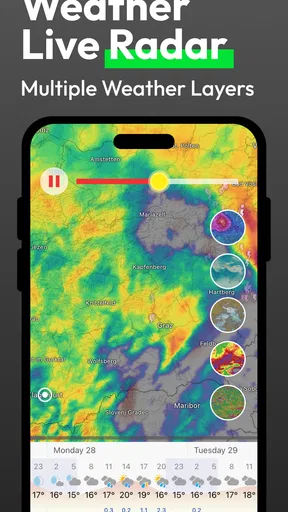
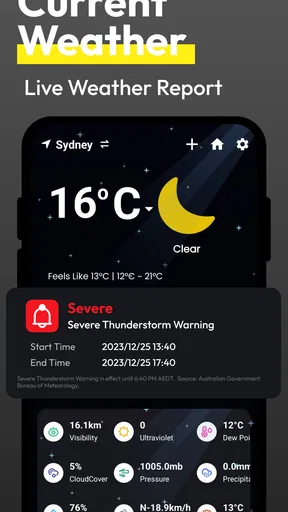
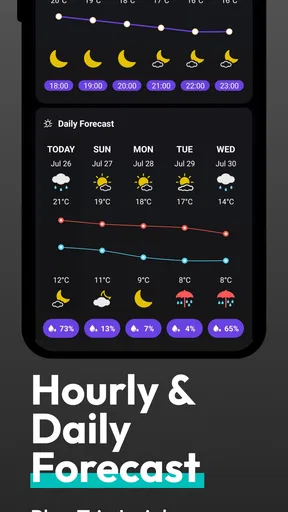
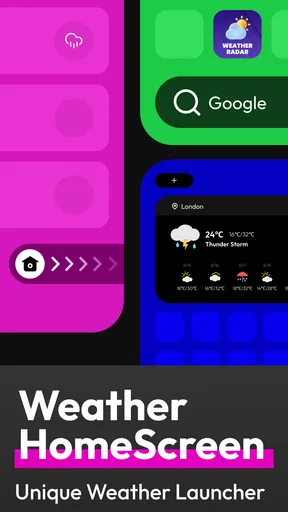
As soon as I opened Flow Weather - Live Radar Home, I was greeted with a sleek and intuitive interface. It's like the app was designed with me in mind—no unnecessary clutter, just the info I need right at my fingertips. The home screen is a comprehensive dashboard, showing the current weather, weekly forecasts, and a live radar map all in one place.
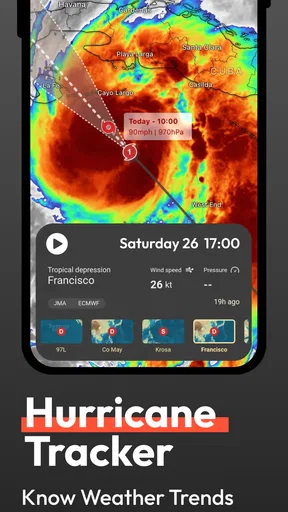
One of the features I found particularly handy is the customizable home screen. You can choose what information is displayed, whether it’s the temperature, humidity, or wind speed. I love being able to tailor the app to my specific needs. Another cool feature is the live radar. It’s incredibly detailed and allows you to track weather patterns in real-time. Perfect for those days when you're planning an outdoor event and need to keep an eye on any incoming storms.
Worth Reading Before You Choose

EA SPORTS FC Mobile 26 Is a Bigger Football Game, but It Takes Time

Flipboard Shows What News Apps Must Do Beyond the Feed

Switching to Android Auto Means Rethinking Your Driving Routine

Google Calendar Makes a Crowded Week Easier to Manage

Ludo King Makes the Most of the Minutes Between Plans

Baby Panda World Brings Quick Play to Modern Phones, but Its Game Library Feels Busy
Reading the radar without overtrusting it
A radar map is most helpful when I use it to answer a narrow question, not when I expect it to provide certainty. Before a walk, outdoor appointment, or short drive, I can look for a broad change in the pattern and compare that with the forecast. If the picture looks unsettled, I treat that as a reason to prepare or check again later, rather than assuming I know the precise minute rain will begin. That is a more reliable way to use any live weather map.
There is also a useful trade-off between a radar view and a forecast summary. The map gives me a visual sense of movement, while the forecast is easier to use for planning across the day or week. I would not replace one with the other: a map can be busy when I only want to know whether to pack a coat, and a summary can feel too broad when I need to decide whether to postpone an outdoor plan. Flow Weather’s appeal is that both are presented as parts of the same weather check.
User Experience
Using the app is as smooth as a summer breeze. Navigating through the various features feels intuitive, and I didn't encounter any lag or crashes. The radar updates quickly, providing real-time weather changes. Plus, the app sends timely notifications, so you’ll always be in the know about sudden weather shifts.
One small gripe I have is with the ads. While they’re not overly intrusive, they do pop up every now and then. Considering the app’s features, though, it’s a small price to pay for such a comprehensive weather tool.
For me, notifications are most useful when they prevent a missed change, not when they simply repeat information I already know. I would keep them only if they fit my routine, and I would still open the app before a decision that has real consequences. A notification can prompt a check; it should not become the sole basis for deciding whether a long drive or outdoor event is safe. That distinction keeps alerts helpful rather than distracting.
Everyday checks where the layout earns its place
Imagine I am about to leave for work and the sky looks clear, but rain is possible later. I can check the current conditions, look ahead at the forecast, and glance at the radar before deciding whether to carry an umbrella or change my departure time. The value is not that the app makes the decision for me; it is that I can make it with fewer separate searches and less guesswork.
The same workflow suits a parent planning school pickup, someone choosing a time for a dog walk, or a gardener deciding whether to water before a wet spell. For a weekend hike, I would use the forecast to plan the general window and the radar as a last-minute check before setting out. In each case, the app is useful as a quick planning aid, not a substitute for local judgement or appropriate safety advice during severe conditions.
Its free price and Everyone content rating also make it easy to try as an everyday utility. Flow Weather has over one million installs and an average rating of 4.5 from around 3,600 ratings, with 61 written reviews. Those figures suggest it has found an audience, but I would still judge it by whether its layout and alerts suit my own habits rather than assuming popularity guarantees a perfect fit.
Why It Stands Out
So, what sets Flow Weather - Live Radar Home apart from the countless other weather apps on the market? For me, it's all about the accuracy and the real-time updates. The app pulls data from multiple reliable sources, ensuring that the information is as accurate as possible. I’ve found the forecasts to be spot on, and the radar map is a game-changer when planning my day.
Another standout feature is the inclusion of weather alerts. These alerts are lifesavers, especially if you live in an area prone to sudden weather changes. The app notifies you of severe weather conditions, allowing you to take necessary precautions well in advance.
Compared with a basic phone weather widget, this app is better suited to someone who wants more than a single temperature and a brief forecast at a glance. A widget can be quicker for a routine morning check; Flow Weather’s radar and customizable dashboard are more useful when I need to investigate a change. Compared with a dedicated meteorological tool, its straightforward home view may be easier for casual use, while specialists who need technical layers or highly detailed observations may prefer an app built specifically for that work.
One practical tip is to use the same order each time: confirm the location, check the forecast window, then look at radar only if timing or nearby conditions could change the plan. That routine prevents me from overinterpreting a colourful map when a simple forecast is enough. It also makes the app more efficient: I can stop once I have the answer I need instead of endlessly refreshing conditions.
Who Will Love This App?
If you’re someone who likes to stay informed about the weather, whether it's for planning your daily commute or your next hiking adventure, this app is definitely for you. Flow Weather - Live Radar Home is also great for families. Having a reliable weather app means you can keep your loved ones safe and dry, no matter what Mother Nature throws your way.
And for those of you who are a bit more tech-savvy, you’ll appreciate the app’s ability to integrate with smart home devices. Imagine asking your smart assistant about the weather, and it pulls data directly from Flow Weather. It’s like having your personal meteorologist!
I would especially recommend it to people who check the weather repeatedly because plans depend on rain or changing conditions: commuters, parents arranging pickups, and anyone scheduling outdoor errands. It is less compelling if all I ever need is a temperature on my lock screen, or if I want a specialized forecasting setup with advanced tools. In those cases, a built-in weather app or a specialist service may be a better match, with less reason to keep another app on my phone.
Where it can add friction
Ads are the clearest trade-off in an otherwise convenient free app. Even occasional interruptions can make a quick check feel less quick, particularly when I am trying to look at the weather while heading out. If I find myself opening the app often, I would pay attention to whether the advertising bothers me in practice; if it does, a simpler alternative may be more comfortable, even if it offers less radar detail.
Weather itself is another limitation no app can remove. Conditions can vary over short distances, and a forecast is not a promise. I would be cautious about making a high-stakes decision from one screen or one alert, especially for outdoor activities where conditions can become dangerous. For ordinary planning, Flow Weather can help me prepare; for safety-critical decisions, I would seek the relevant local guidance as well.
Final Thoughts
All in all, Flow Weather - Live Radar Home is a robust, user-friendly app that offers a wealth of features for anyone looking to stay ahead of the weather. While it has a few minor drawbacks, like the occasional ad, the benefits far outweigh any cons. Whether you're a casual user or a weather enthusiast, this app is sure to keep you informed and prepared for whatever the skies bring.
For me, its strongest case is the small amount of time it can save across repeated checks: one place to see current conditions, look ahead, and use radar when a change matters. Its weaker case is for someone who wants nothing beyond a basic glance, or who expects exact certainty from a forecast. I would try it if those combined views match my routine, then keep it only if the dashboard and alerts genuinely make weather decisions easier.
Ready to give it a try? You can download it from your favorite app store and see for yourself why it's becoming a favorite among weather watchers. Stay dry, folks!
Pros
- Detailed and accurate weather forecasts.
- User-friendly interface with easy navigation.
- Real-time radar updates for precise tracking.
- Customizable alerts for severe weather.
- Minimal battery consumption during use.
Cons
- Ads can be intrusive at times.
- Some features locked behind a paywall.
- Occasional lag during radar updates.
- Limited widget customization options.
- Requires stable internet for full functionality.
FAQs for Flow Weather - Live Radar Home
What is Flow Weather - Live Radar Home?
Flow Weather - Live Radar Home is a comprehensive weather application designed to provide real-time weather updates, radar maps, and forecasts. It offers features like live radar, severe weather alerts, and detailed weather statistics to ensure users are always prepared for any weather conditions.
How accurate is the weather data provided by Flow Weather?
Flow Weather sources its data from reliable meteorological services, ensuring a high level of accuracy. The app updates data frequently to reflect the latest forecasts and real-time conditions. However, like any weather service, slight discrepancies can occur due to rapidly changing weather patterns.
Does Flow Weather - Live Radar Home offer any unique features?
Yes, Flow Weather stands out with its customizable home screen widgets, detailed radar maps, and hyper-local forecasts. Users can set up personalized alerts for severe weather and track multiple locations. The app also includes a sleek, user-friendly interface that enhances the overall experience.
Is Flow Weather free to use, or are there in-app purchases?
Flow Weather offers a free version with essential features. For users looking for an ad-free experience and additional functionalities, there are in-app purchases available. These may include premium features like advanced radar options, extended forecasts, and customization tools.
Can Flow Weather be used internationally?
Yes, Flow Weather is designed for global use, offering weather updates and forecasts for locations worldwide. Users can easily switch between different regions and set multiple locations to monitor the weather in various areas, making it suitable for travelers and international users.


